
Screen Self-Service – Release notes
Version 5.7.0 - 16 November 2026
NEW AI features switch. Jira admins now decide whether the optional Rovo agent "Screen Assistant" can be used, with AI features (Rovo agent) on the configuration page.
AI features are off by default, also on sites that already had the app installed.
While they are off, the app hides every Ask Rovo button and the Rovo prompts in the Ctrl+K / ⌘K palette.
The Screen Assistant then refuses every request and tells users where a Jira admin can turn it on.
SUPERPORT can pause AI features for all sites if needed. Your setting is kept and applies again afterwards.
13 November 2026
IMPROVED State map on screen cards. Each screen card on the Issue types page now shows a small map of the Default, Create, Edit and View states instead of a tab thumbnail.
A filled box means the screen is used for that state (directly, or by inheriting from Default). An outlined box means another screen handles it.
Point at the map, or focus it with the keyboard, to see which screen each state uses.
Pointing at a box highlights the matching card, and pointing at a card highlights its box.
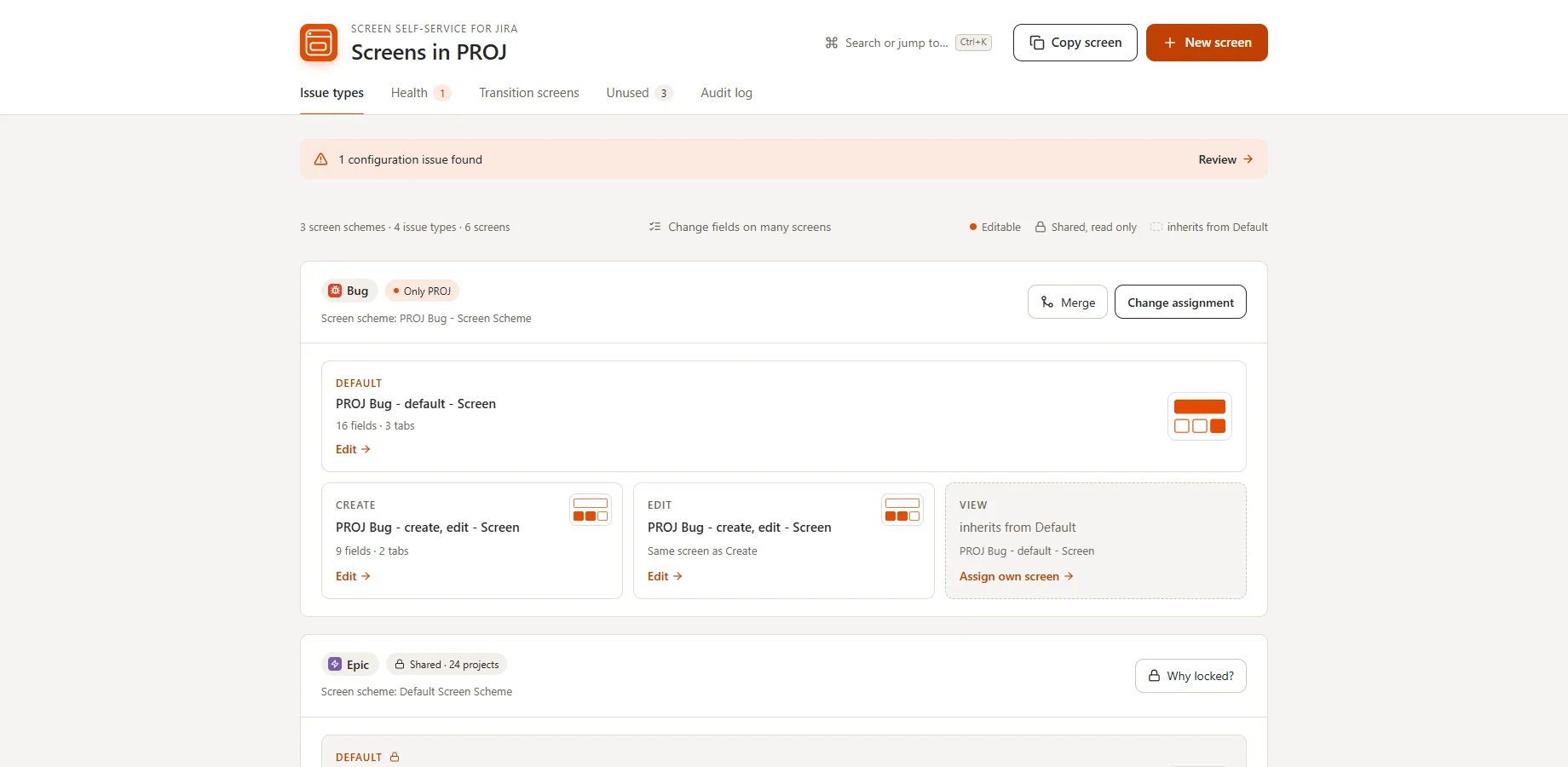
DOCS The documentation now explains the state map and Atlassian's platform limits (for example, automatic retries when Jira reports too many requests).
First Marketplace release - 5 November 2026
NEW Screen Self-Service for Jira is available on the Atlassian Marketplace. Project admins of company-managed projects can manage their own screens:
Overview of every issue type with its Default, Create, Edit and View screen, and which screens are editable, shared or inherited.
Drag-and-drop screen editor for fields and tabs. Missing fields are added to the project's field scheme automatically.
Change which screen an issue type uses, with a plain-language preview before every save.
Split an issue type off a shared screen scheme, or merge issue types.
New screens, and copies of any screen on the site as a template.
Change fields on many screens at once.
Transition screens for workflows only your project uses.
Health check with one-click fixes, and clean-up of unused screens with an optional automatic deletion.
Undo for the last change (24 hours), and a full audit log.
Optional Rovo agent "Screen Assistant".
Ctrl+K / ⌘K command palette, English and German, light and dark theme.
Shared screens and schemes stay locked, with the reason shown. Every request re-checks the user's real Jira permissions. The app runs on Atlassian and sends no data outside it.
Documentation by George Papasotiriou, developer of Screen Self-Service for Jira · SUPERPORT. Need help? Open a request in the support portal.
Still stuck? Our team answers in English, German and Greek.
Open a support request